How to manage Chart of Accounts in Aratum Ledger?
The Chart of Accounts (CoA) in a ledger is a structured list of all the accounts used by an organization to categorize and record financial transactions systematically. It serves as the backbone of a company's financial recording system, organizing accounts into categories such as assets, liabilities, equity, revenues, and expenses. This organization facilitates accurate financial reporting and analysis by ensuring that transactions are recorded in the correct accounts. A well-designed CoA helps in streamlining the accounting process, enhancing the clarity and consistency of financial information, and supporting compliance with accounting standards. It is tailored to the specific needs of a business, reflecting its unique operations, financial structures, and reporting requirements.
Chart of Accounts Setting
Our Chart of Accounts Table is customizable, enabling users to easily adjust display fields to fit their preferences with just a few simple settings.
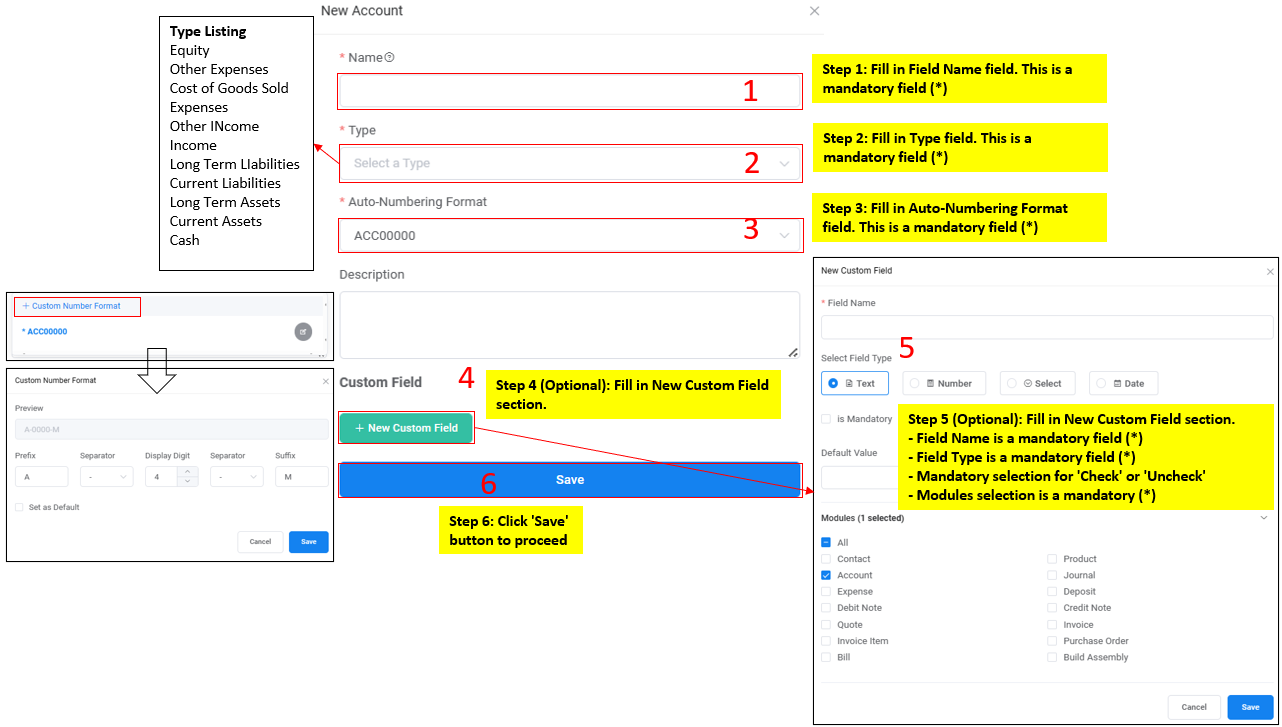
User can add new account with option below:
a) To add New Account manually.
Account Creation through Manual Flow
b)Through import template.
Account Creation through Import Flow